Bottom Navigation
Setup
Let's create a template Flutter project and download the files and put them in the correct place, following these paths:
-
lib/l10n/app_en.arb
-
lib/l10n/app_es.arb
-
lib/src/model/decor.dart
-
lib/src/unit_widget/app/app_paper.dart
-
lib/src/unit_widget/app/app_script.dart
-
lib/src/unit_widget/app/app.dart
-
lib/src/widget/bottom_bar.dart
-
lib/src/widget/keep_alive_page.dart
Install dependencies:
dependencies:
...
  paper: ^1.0.0
  flutter_localizations:
    sdk: flutter
  intl: any

flutter:
  ...
  generate: true
In the lib/main.dart, replace the content with the following:
import 'package:paper/paper.dart';

import 'src/unit_widget/app/app.dart';

void main() {
    final app = WidgetAgent<AppPaper>();
    PaperFrameworkEstablisher().initializeWidgetUnit((s) => App(s, agent: app));
}
We can run the command $ flutter gen-l10n to generate localization and run. Or
just run without generating.
Run it and we have:
Breakdown
Localizations
The AppLocalizations should be considered as a Model. It is immutable
and acts as a data structure for Localizations.
And as suggested before, the observable-sit-on-top architecture should
not be applied in this pattern. Using AppLocalizations.of(context) to retrieve
translations is prohibited. The translations have to be passed down via
constructor to objects that need them. This also applies to Safe area's padding.
Decor
The TextDecor and ColorDecor extend from Model.
They are designed as singletons because there should be one instance of each to
define the text theme and color for the UI. There is no need to create multiple
instances. And because they are singletons, they have their keys hardcoded as
there would be no comparison because again there is only one instance throughout
the app lifecycle.
App
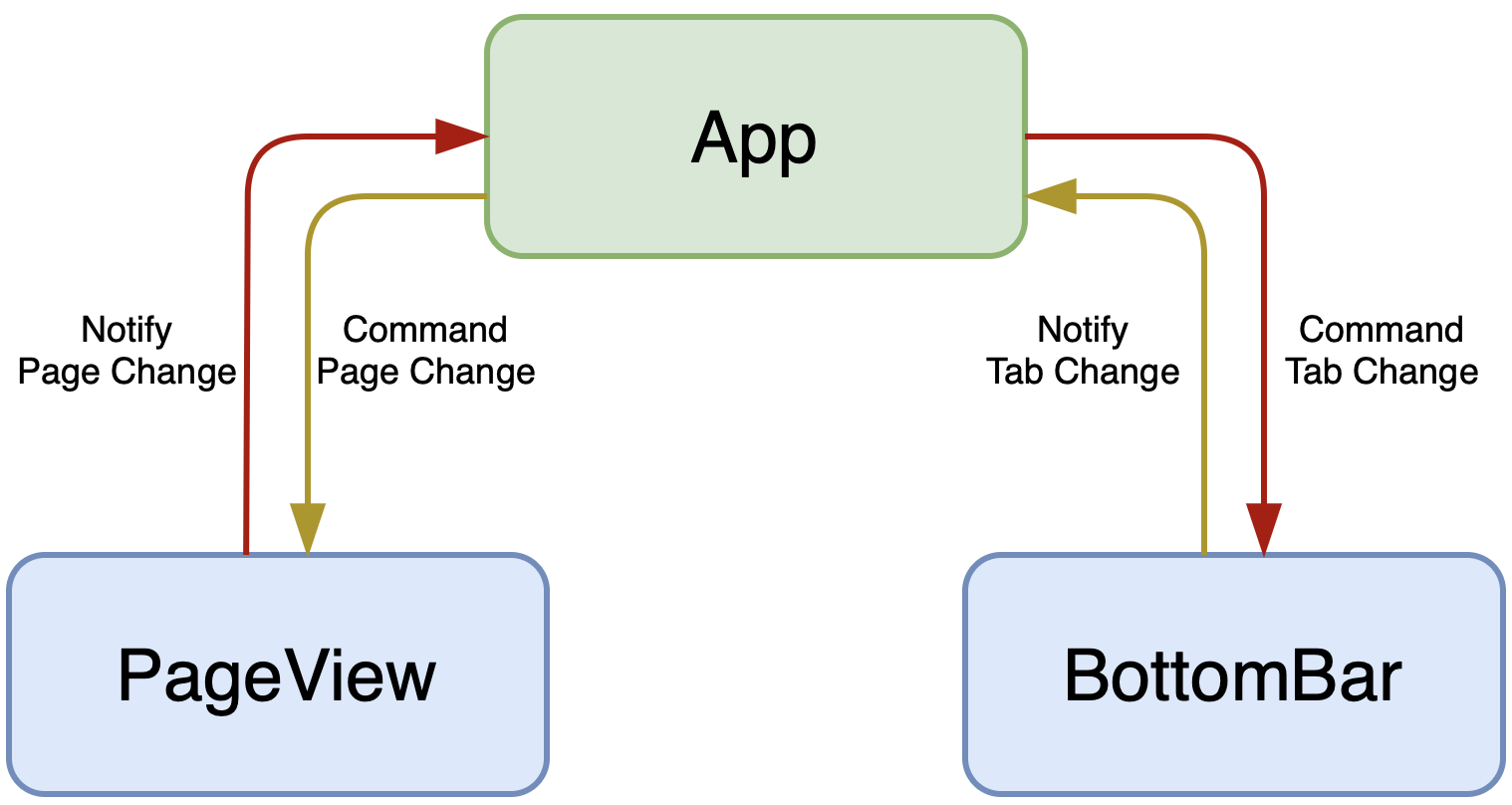
The App is the very top unit staying above every unit in the app structure. If the app is a company, the App is the CEO or the top manager.
The App extends from Unit
PageView
When we swipe between pages, the PageView notifies the App via triggering a
listener - onPageChanged, in which the App modifies the index to update the
BottomBar, or we can say the App has given a "command" to the BottomBar to
update its index.
BottomBar
Similar to PageView, when the BottomBar's index is changed by user tapping on the
icons, the BottomBar notifies the App via triggering a listener -
onChanged, from which the App has given a "command" to the PageView to update
its index.
Paper
The AppCurrentTab paper represents a request to the App to update the current
index of both BottomBar and PageView based on AppCurrentTab.index
// lib/src/unit_widget/app/app_script.dart

void onCurrentTab(AppCurrentTab p, AppState s, SourceVerifier ifFrom) {
    ifFrom(s.bottomBarController)?.setIndex = p.index;
    s.setPage(ifFrom(s.pageController), p.index);
}
Why do we have to create and use AppState.setPage instead of directly using
PageController.animateToPage?
The problem lies in the PageController itself. When we use
PageController.animateToPage, it also notifies the App via onPageChanged as
well. It does NOT make sense, especially in this pattern. Imagine A gives a
command to B to change its state, for example a number from 0 to 1, and then
B immediately notifies back to A that its number just changed to 1. It
will probably create a loop and A commands B, B notifies back to
A, then A commands B again, and so on.
This issue also occurs with other "controllers" in the Flutter library:
TextEditingController, ScrollController, etc. And we are going to re-design
widgets to which those controllers attach.
Just keep in mind that when a parent gives a "command" to its children, those actions must not lead to backward notification about the changes that were made by those commands.