Concept
First, let's have a brief introduction to some key aspects of our approach:
State
What is state? State is a status, condition, or a combination of all attributes of an object at a point in time.
class Rectangle {
    String text;
    String color;

    Rectangle({required this.text, required this.color});
}
We have a class to construct a rectangle; its attributes are text and color, which are variables. It can also be said that Rectangle is a stateful object.
Let's have an example:
On the left, we have a rectangle with text "cat" and color "red". Its State is defined as text of cat and color of red. Later, through some actions, the rectangle changes its State to text of dog and color of blue.
Structure
Here's a brief introduction to how the app is structured and how its components communicate and react to state changes:
-
The app is built with a tree of components, which is similar to the Flutter widget tree or React component tree.
-
Components need the capability to notify their parent when they are able to change their state independently. (We will cover this in more detail in the examples).
-
Components change their state by reacting to 2 sources: their children's state change notifications and their direct parent's commands.
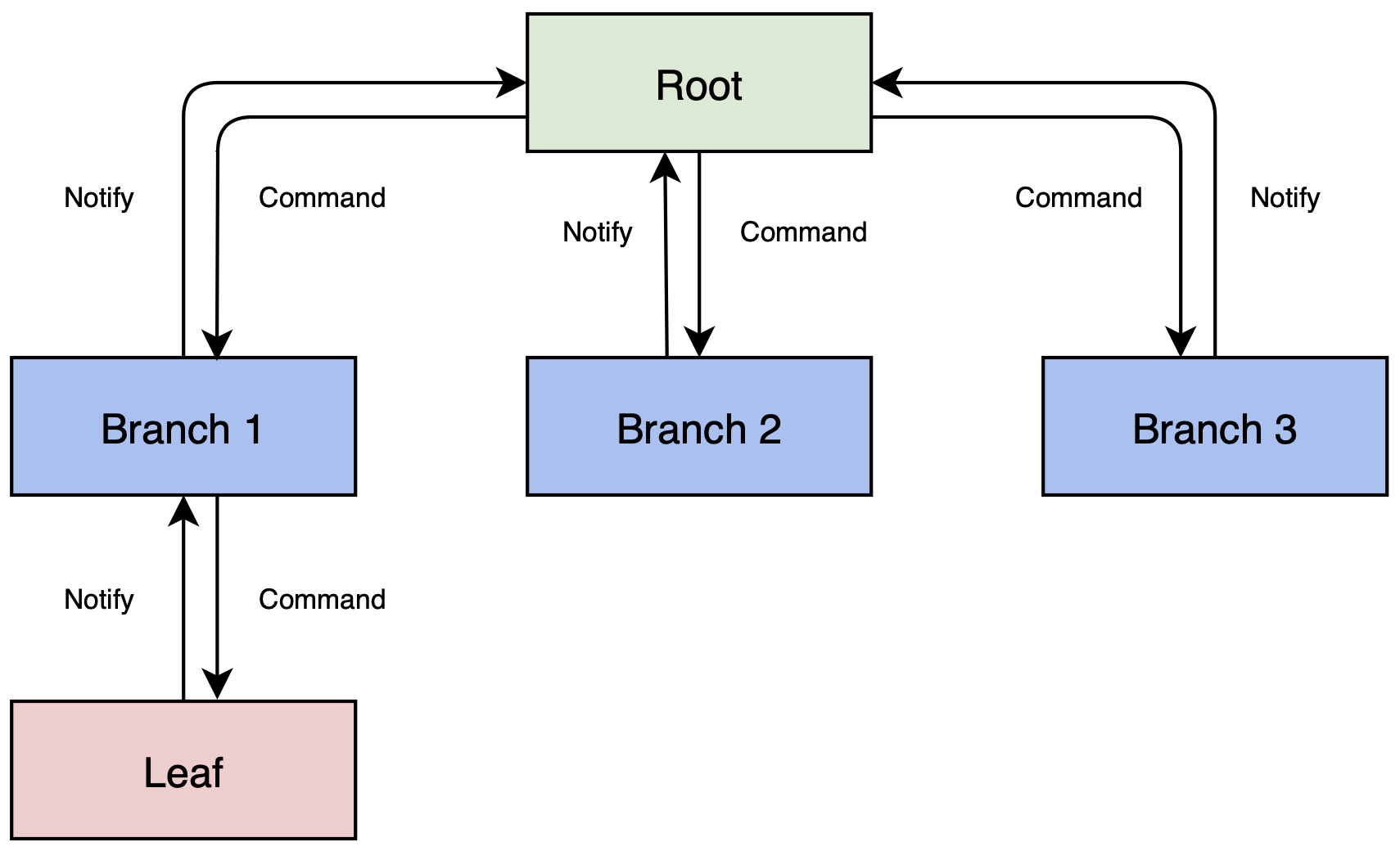
The diagram above illustrates the communication flow in the Paper pattern (our state management approach):
-
When Leaf changes its state independently, it sends a Notify message to its direct parent - Branch 1,
-
When Branch 1 receives the Notify from Leaf, it processes the change and modifies its own state accordingly, then sends a Notify to its direct parent - Root,
-
When Root receives the Notify from Branch 1, it may modify its own state if needed (for example, it might send a Command to Branch 2 to perform an action, effectively changing Branch 2's state).
-
Since Root is the topmost component in the tree, the communication sequence stops there.
This overview might seem brief, but reading all the theory at once can be overwhelming. Let's jump to practical examples to see how this works in real code, and we will cover the concepts in detail as we go along.